
-
 Orvell MonitoringUmfangreichePC Überwachungmit Bildschirmaufnahmelokal, im Netzwerk oder aus der Ferneschnell installiert & einfach zu verwendendeutsche Versionfür Privat & UnternehmenAngebot: statt
€79.95nur €59.95
-
 PC Überwachungaus der FerneOrvell Monitoringunsichtbare Aufnahmesendet automatisch Reportedeutsche Versionfür Privat & Unternehmen
Schnell und einfach jeden PC überwachen: Orvell Monitoring 8.2 Umfangreich. Mehrfach ausgezeichnet.
PC Überwachung mit Orvell Monitoring
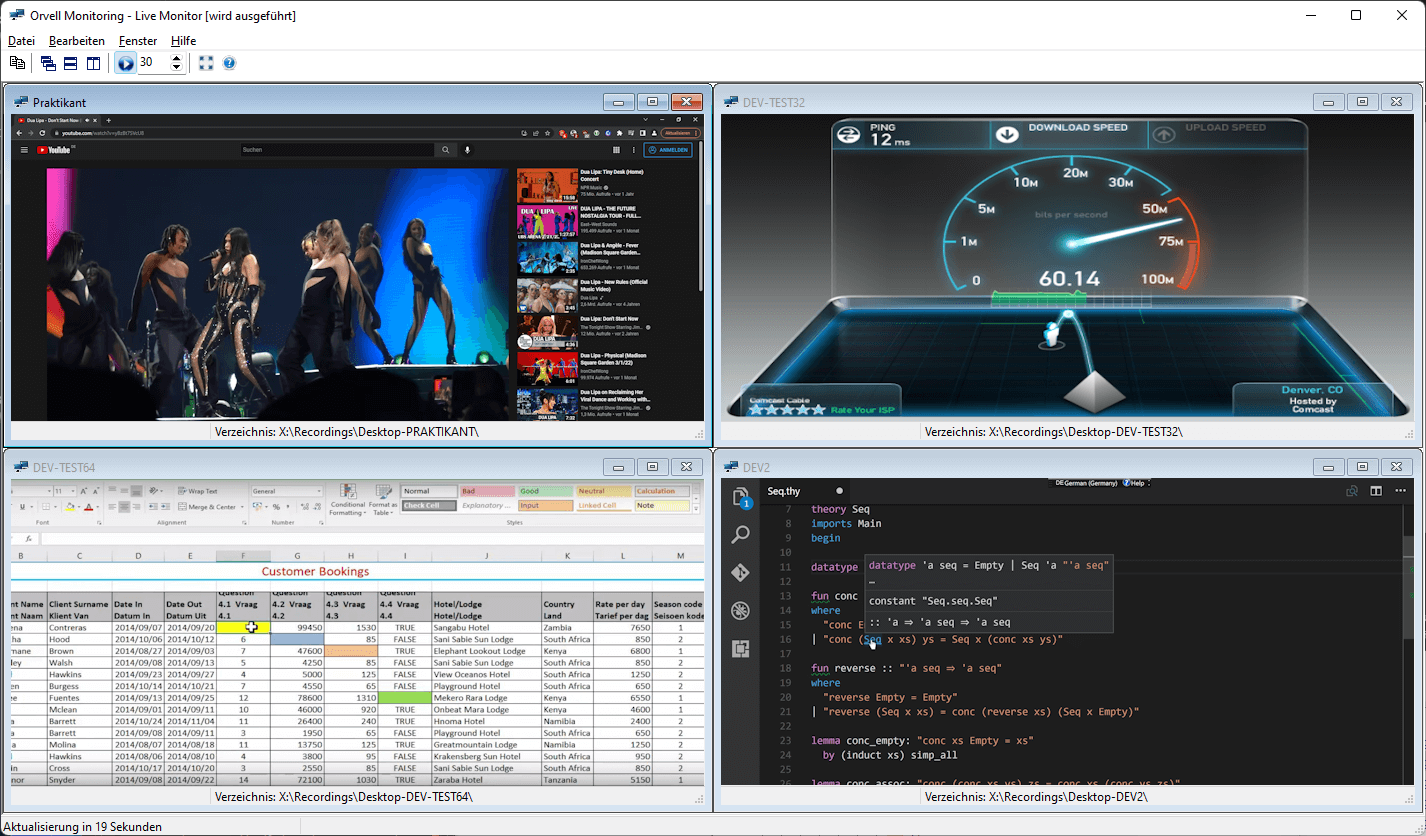
Orvell Monitoring überwacht und protokolliert alle Aktivitäten der PC-Benutzer. Ohne den Benutzer zu stören, werden die Aufnahmen automatisch archiviert oder regelmäßig per E-Mail zugestellt.
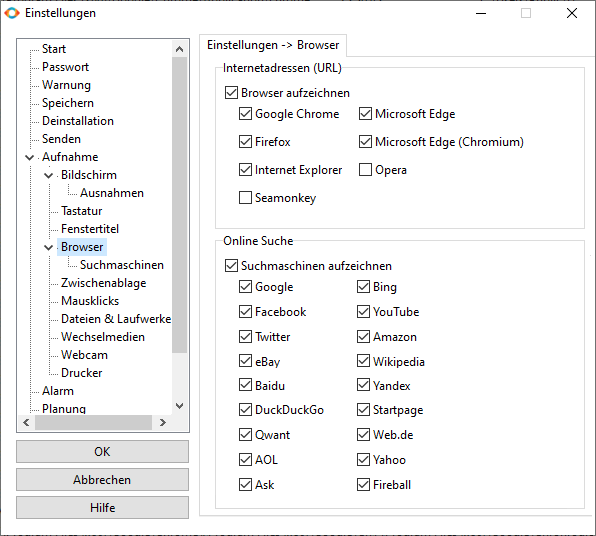
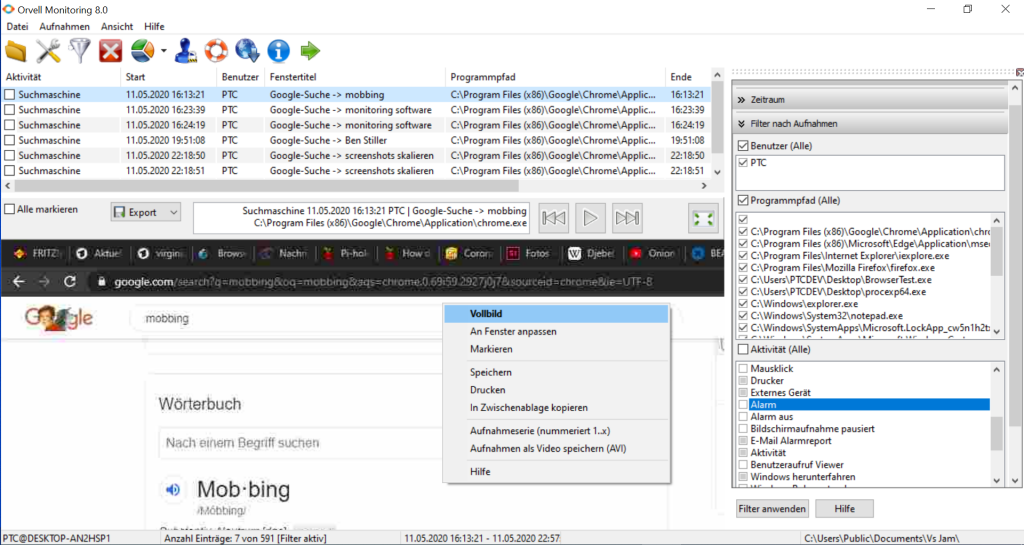
Die Bildschirmaufnahme erlaubt es im Nachhinein zu sehen, was alles am PC passiert ist. Der Keylogger nimmt alle Tastatureingaben auf und der Internetrekorder, die besuchten Webseiten. Auf Wunsch alles unsichtbar in Hintergrund.
Schnell installiert und einfach zu verwenden - Deutsche Version - Für Windows Vista/7/8/10/11
Bekannt aus
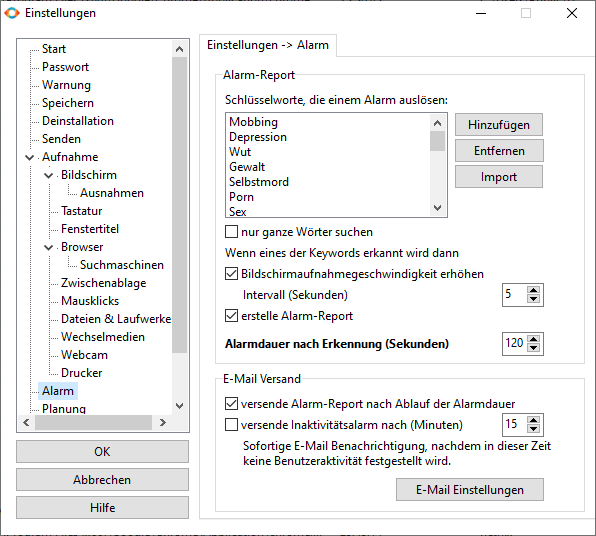
Vollständige PC Kontrolle - über 100 Aufnahmefunktionen
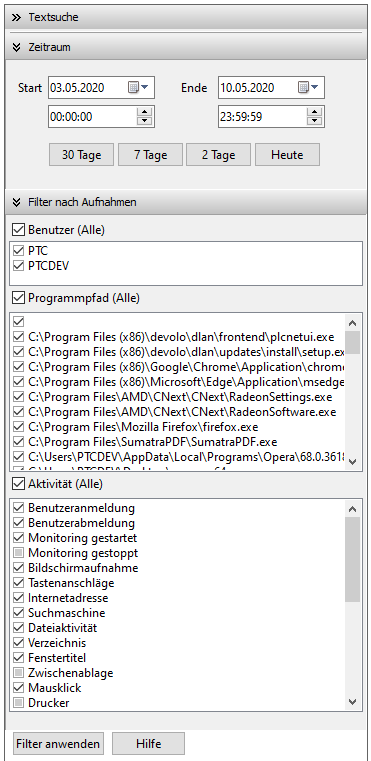
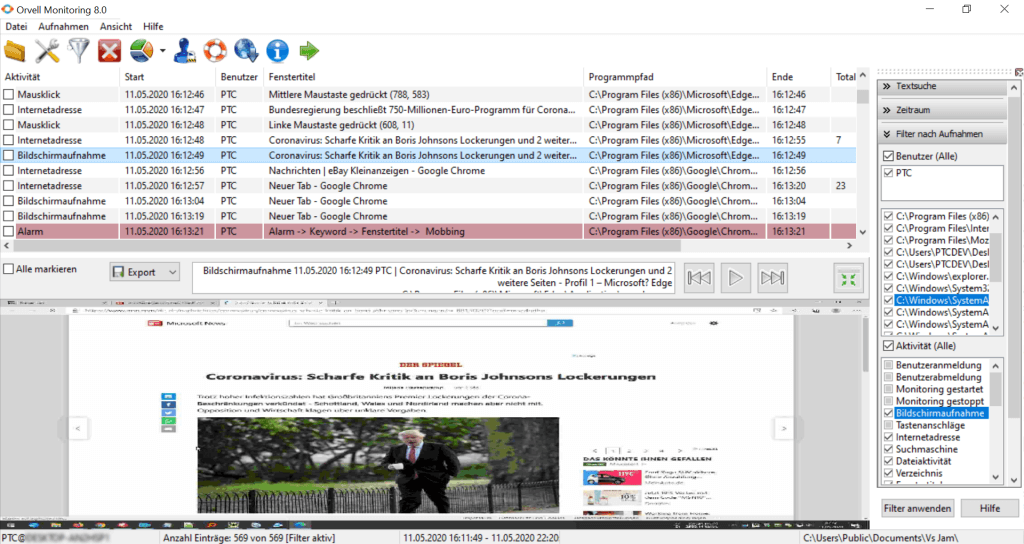
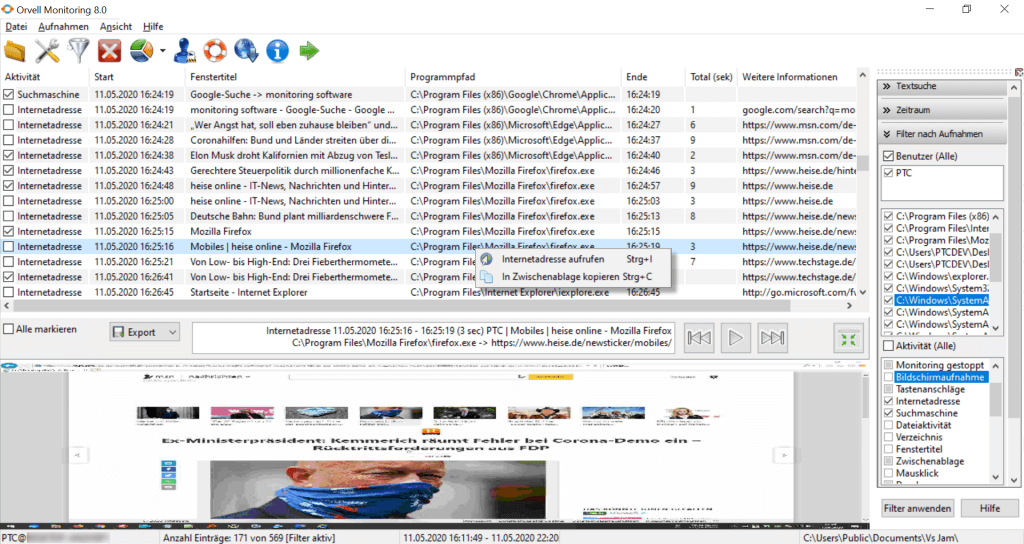
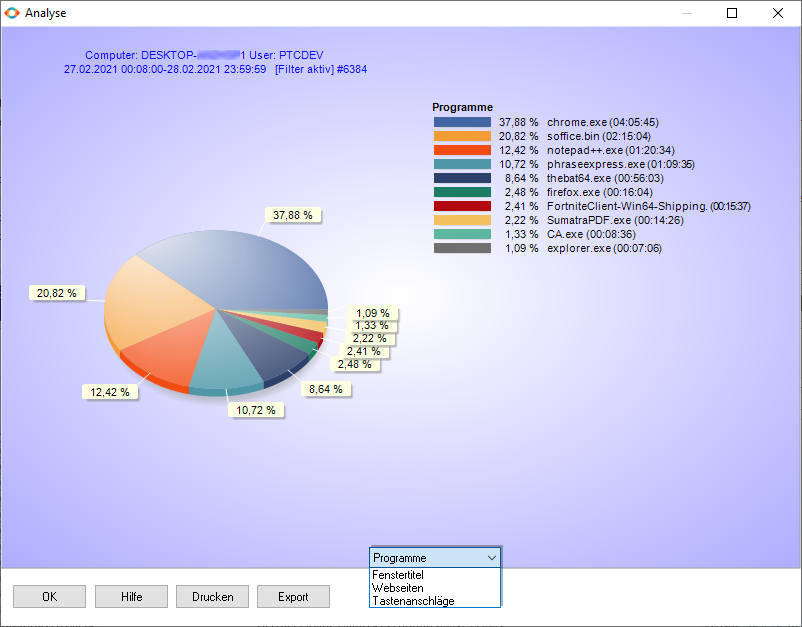
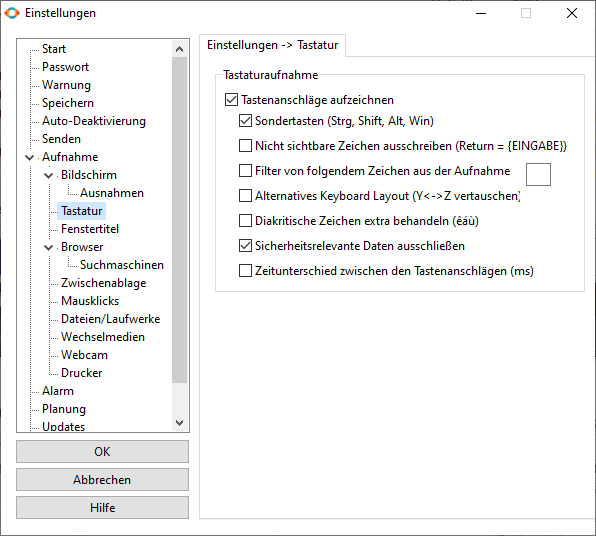
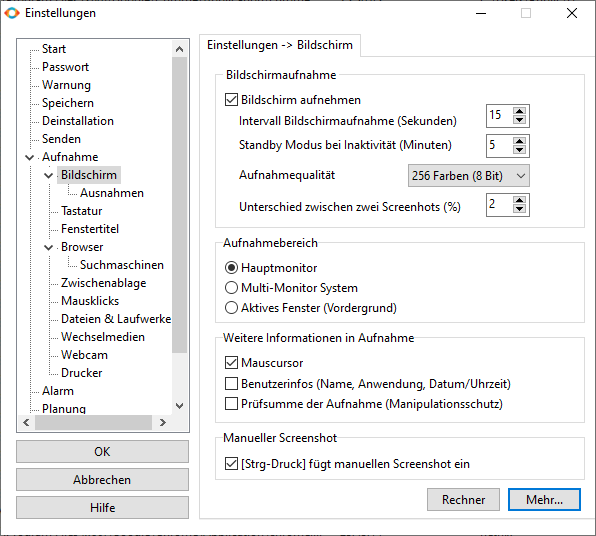
Unsichtbarer Modus
Orvell Monitoring verfügt über eine sehr ausgereifte Tarn-Funktion (d.h. diese läuft unbemerkt im Hintergrund). Wenn die Tarn-Funktion (Stealth Modus) aktiviert ist, wird die Benutzerüberwachung nicht über ein Icon dargestellt, auch nicht als installiertes Programm unter „Software“ aufgeführt oder in der Taskleiste angezeigt.
Um sich die Aufzeichnungen später wieder anzusehen oder Programmeinstellungen zu ändern, rufen Sie die Monitoring-Software mit der nur Ihnen bekannten Tastenkombination (Hotkey) auf und geben Ihr Passwort ein.
Ohne Ihr persönliches Passwort kann die Monitoring-Software nicht deinstalliert, über-installiert oder neu konfiguriert werden.
Wie funktioniert die PC Überwachung?
1
ORVELL MONITORING FÜR PC KAUFEN
Vergewissern Sie sich, dass der zu überwachende PC mit unserer Monitoring-Software kompatibel ist. Füllen Sie das Bestellformular aus und nehmen Sie die Zahlung vor.
Weitere Anweisungen erhalten Sie umgehend nach dem Kauf.
2
DOWNLOAD UND INSTALLATION
Laden Sie über den Download-Link aus der Bestell-E-Mail die Installationsdatei herunter und starten Sie diese anschließend. Der Assistent führt Sie durch die Installation, was nur Sekunden dauert. Anschließend fängt die Monitoring-Software automatisch an, alle PC-Aktivitäten unbemerkt im Hintergrund zu protokollieren.
3
ALLE PC-AKTIVITÄTEN ANSEHEN
Um sich die aufgenommenen PC-Aktivitäten anzusehen oder Programmeinstellungen zu ändern, rufen Sie die Monitoring-Software mit der nur Ihnen bekannten Tastenkombination (Hotkey) auf. Diese wurde während der Installation angezeigt. Nach Eingabe Ihres Passworts sehen Sie sich die erfassten Aufnahmen an.
Sofort downloaden und in 5 Minuten starten!
Unternehmen, Behörden und Kommunen haben auch die Möglichkeit per Fax-Bestellschein eine Bestellung aufzugeben.
Aktion: 007 USB Karte - nur für kurze Zeit

Erweitern Sie Ihre Bestellung und erhalten Sie Orvell Monitoring zusätzlich zu dem Sofort-Download auf unserer limitierten USB Karte im Visiten-/Scheckkartenformat & 007-Design. Benutzbar wie ein USB Stick.
Vorkonfiguriert mit Ihrer Lizenznummer zur sofortigen Installation inkl. automatischer Freischaltung.
Speicherkapazität: 4 Gigabyte. Design: 007 Logo im Hochglanzdruck
Nur solange der Vorrat reicht! Jetzt kaufen
Wir sorgen für Sicherheit - die Presse über Orvell Monitoring
"Mit Orvell Monitoring steht eine Software zur totalen Überwachung eines Computers zur Verfügung. Gesamtnote 1,7" - PC Welt

"Was Ihr PC Ihrem Chef, Kollegen, Eltern, Ehepartnern, Kindern verraten kann… Im privaten Bereich dürfen Sie Spionage-Programme wie etwa Orvell Monitoring von ProtectCom einsetzen." - Computer BILD

"Rein praktisch bietet Orvell Monitoring alles, was man als IT-Schnüffler erwartet. Fazit: Orvell Monitoring erfüllt seine Aufgabe sehr gut." - CHIP

"Orvell Monitoring: Wollen Sie Ihren PC gründlich überwachen, dann gibt es kaum eine umfangreichere Lösung." - PC Praxis

"Ist Ihr PC vollständig unter Ihrer Kontrolle? Wenn nicht, liest jemand vielleicht E-Mails mit, protokolliert Webseitenbesuche und Passwörter oder fotografiert Bildschirminhalte ab." - c't über Orvell Monitoring

"Dieses individuell konfigurierbare Tool sei jedem empfohlen, der die perfekte Kontrolle über seinen (oder andere) PCs will. Fazit: Orvell Monitoring erweist sich als ideales Überwachungswerkzeug. Es protokolliert jegliche Aktivität am PC zuverlässig." - PC Professionell

Kontakt
Sehr gerne unterstützen wir Sie bei Ihren individuellen Fragen und Anregungen rund um unsere Produkte.
Fragen und Antworten
Antworten auf häufig gestellte Fragen
Wenn Sie Orvell Monitoring jetzt kaufen, erhalten Sie alle Updates ein Jahr kostenlos!
Zahlungsabwicklung: MyCommerce/ShareIt aus Köln ist unser langjähriger Partner für die Bestell- & Zahlungsabwicklung. Gerne beantwortet Ihnen MyCommerce/ShareIt alle Fragen zum Bestellvorgang und den Zahlungsmethoden. Firmen ist es möglich auf Rechnung zu bestellen.
Sicherheit: alle Zugriffe auf die Bestellseiten des Online-Shops erfolgen über die sogenannte SSL-Technologie (Secure Socket Layer) bei unserem Partner MyCommerce/ShareIt. Alle gängigen Web-Browser unterstützen diese Technologie und stellen damit sicher, dass Ihre persönlichen Daten, die Sie im Rahmen des Bestellprozesses angeben, sicher übertragen werden. MyCommerce/ShareIt verwendet dabei Technologien von Norton/Symantec.
Wenn Sie trotzdem Ihre Kreditkartendaten nicht über das Internet senden wollen, können Sie die Informationen auch gerne telefonisch oder per Fax an unseren Kundenservice übermitteln.

Datenschutz: MyCommerce/ShareIt wurde mit dem Datenschutzsiegel von TRUSTe ausgezeichnet. Dies bedeutet, dass diese Datenschutzrichtlinie und die Praktiken von TRUSTe auf Übereinstimmung mit den TRUSTed Cloud Program Requirements von TRUSTe, einschließlich Transparenz, Haftungsumfang und Auswahl bezüglich der Erhebung und Verwendung Ihrer persönlichen Daten, getestet wurden.
Angaben auf der Kreditkartenabrechnung/Kontoauszug: auf Ihrer Kreditkartenabrechnung oder Überweisung ist lediglich MyCommerce/ShareIt mit einem Verwendungszweck aufgeführt. Die erworbene Software wird dort nicht genannt.
Lizenzierung: die Software wird nach Anzahl der zu überwachenden Computer lizenziert. Beispiel: wenn Sie einen Computer überwachen möchten, reicht eine Einzellizenz aus. Möchten Sie 2 Computer überwachen, benötigen Sie eine 2er Lizenz (= Mehrfachlizenz), usw.
Bei dem Abruf der Aufnahmen über ein Netzwerk muss der PC, mit dem die Aufnahmen abgerufen werden, nicht lizenziert werden.
Laufzeit der Software: die Software funktioniert zeitlich unbegrenzt.
Support/Hotline: mit dem Kauf erhalten Sie automatisch das Ultimate Care/Premium Support Paket inklusive 12 Monate Updates, Support uvm. für die Software.
CD-ROM/USB-Card Lieferung: wählen Sie für die zusätzliche CD-ROM/USB-Card Lieferung auf der Bestellseite "Backup CD/USB-Card". Sie erhalten die Software dann neben der E-Mail-Lieferung zusätzlich auf dem Postweg (zzgl. Versandkosten)!
Kauf und Installation: es ist nicht unbedingt notwendig, dass Sie die Software über den PC kaufen, auf dem Sie die Software einsetzen möchten. Kopieren Sie einfach nach dem Kauf die Installationsdatei z.B. auf einen USB Stick und führen Sie diese später auf dem Zielgerät aus.
Angabe Postadresse: die Postadresse wird für die Erstellung Ihrer Rechnung benötigt, die Ihnen elektronisch als PDF Datei an Ihre E-Mail-Adresse zugestellt wird. Sie werden von uns oder MyCommerce/ShareIt niemals etwas per Post erhalten - außer, Sie wählen die zusätzliche CD-ROM/USB-Card Lieferung.
Abo: Sie gehen kein Abo ein! Wir bzw. MyCommerce/ShareIt nehmen keine wiederkehrenden Abbuchungen vor.
Anti-Spam: kein Kunde oder Interessent wird unaufgefordert E-Mails von uns erhalten - außer, Sie haben sich freiwillig auf unserem Newsletter eingetragen.
30 Tage Geld zurück Garantie: Wir sind von der Qualität unserer Software überzeugt und möchten, dass Sie damit zufrieden sind. Sollten Sie wider Erwarten technische Probleme mit unserer Software haben, die unser Kundenservice nicht lösen kann, können Sie innerhalb von 30 Tagen ab Kaufdatum von Ihrem Vertrag zurücktreten und Sie erhalten eine volle Rückerstattung des Kaufpreises gemäß den Rückerstattungsrichtlinien. Diese Rückgabegarantie beschränkt nicht Ihre gesetzlichen Rechte und somit auch nicht Ihr Widerrufsrecht.Noch Fragen? In unserem Supportbereich erhalten Sie weitere Antworten oder kontaktieren Sie uns, falls Sie noch Fragen haben sollten.
Da wir keine Daten/Aufnahmen von Ihren PCs speichern, sind Ihre Daten 100% sicher.
Im Gegensatz zu anderen Monitoring-Lösungen zur Benutzerüberwachung, die den Abruf der Aufnahmen über eine Webseite/Portal erlauben, speichern wir keine Ihrer Aufnahmen auf unseren Servern! Die Aufnahmen bleiben immer unter Ihrer Kontrolle, da diese entweder lokal auf dem PC oder in Ihrem Netzwerk gespeichert oder über Ihren Mailserver verschickt werden.
Der benötigte Festplattenspeicher ist hauptsächlich von dem Umfang der Bildschirmaufnahmen abhängig:
Ein typischer 8-Stundentag mit Bildschirmaufnahme alle 30 Sekunden (in 256 Farben) beansprucht täglich ca. 50 MB Festplattenspeicher.
Wartungsfrei: voreingestellt protokolliert die Monitoring-Software die Aufnahmen der letzten 7 Tage (frei einstellbar). Mit 0.5 GB Festplattenspeicher werden somit problemlos eine Woche PC-Aktivitäten archiviert.
Wichtig: Sie dürfen Orvell Monitoring nur auf PCs installieren, die Sie besitzen! Wenn Sie die Monitoring-Software auf anderen PCs installieren möchten, müssen Sie Eigentümer dieses Computers sein! Die Software-Lizenzvereinbarung verpflichtet Sie, jeden zu informieren, dessen PC Aktivitäten mit Orvell Monitoring aufgezeichnet werden.
Bitte beachten Sie folgenden wichtigen Hinweis für den Einsatz in Deutschland: Orvell Monitoring verfügt über Überwachungsfunktionen - insbesondere "Aufnahme der Tastenanschläge" und/oder "Bildschirmaufnahme" - die der Genehmigung der zu überwachenden Personen bedarf. Sie machen sich bei Nichtbeachtung im Sinne von §201, §202 StGB strafbar. Bei Verwendung der Software in anderen Ländern müssen Sie sich über die dortigen gesetzlichen Bestimmungen informieren und diese beachten.
Falls Sie Fragen zur Rechtmäßigkeit des von Ihnen geplanten Einsatzes unserer Software haben, wenden Sie sich bitte an eine Rechtsberatung Ihrer Wahl. Wir selbst können keine Rechtsberatung erteilen.
Bemerken Sie einen rechtswidrigen Einsatz unserer Software, so unterrichten Sie uns bitte umgehend.
Falls sich ein Antivirenprogramm an Orvell Monitoring stört, handelt es sich hierbei um ein "False Positives" (Fehlalarm). Orvell Monitoring funktioniert grundsätzlich mit jedem Antivirenprogramm, dass Ausnahmen zulässt. Heutzutage verfügt jedes Antivirenprogramm über eine Ausnahmeliste. Orvell Monitoring zeigt deshalb bereits bei der Installation seine Dateinamen an, die man schnell in diese Ausnahmeliste des Virenscanners einträgt; falls notwendig.
Dadurch wird das Monitoring-Produkt vor einer zukünftigen Störung oder Erkennung durch den Virenscanner dauerhaft geschützt und Sie brauchen sich darum keine Gedanken mehr zu machen.
Über unsere Support-Datenbank oder unsere Hotline erhalten Sie für alle gängigen Antivirenprogramme ausführliche Anleitungen.
Kostenlose Software zur PC Überwachung:
Beachten Sie unbedingt beim Download von Programmen zur PC Überwachung mit Keylogger als Freeware (kostenlos) aus ungeprüften Quellen,
Orvell Monitoring ist die umfangreiche ausgezeichnete effiziente Überwachungssoftware für Windows PCs.
Mit mehr als 50.000 zufriedenen Kunden in über 80 Ländern ist
Orvell Monitoring eines der erfolgreichsten Programme zur PC Überwachung weltweit.